

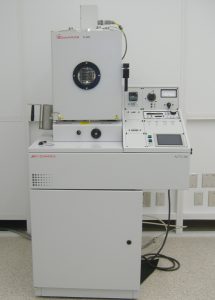
Thermal Evaporator
About
The Auto 306 FL400 Thin Film Deposition System is set up for sequential evaporation of up to four materials without breaking vacuum. The pumping system incorporates a 540-liter/sec turbo molecular pump backed by an XDS10 dry running primary pump. A rotary work holder is fitted to the chamber top plate. Film thickness is monitored using a Sigma SQM160 quartz crystal film thickness deposition monitor with digital display of deposition rate and deposition thickness. There is the capability to control up to 2 source shutters automatically and close the electromagnetic source shutter when pre-programmed termination thickness values are achieved. Substrate heating is via 500W Quartz lamp heater assembly with lamp.
Fees
The instrument usage is $21/run. The users must log into the log book and the individual Excel sheet prior to using the instrument for billing purposes. The log book comments will help in assessing a possible malfunction which may occur during the user’s time.
Documents
FAQs
Supplies such as spare baskets, evaporants, tape, etc. are stored in the red tool box located in the cleanroom. The tool box drawer is labeled “Thermal Evaporator”.
Do not use scotch tape.
One option is to use heat-resistant tape. A roll of heat-resistant tape is stored in the red tool box.
An alternative is to use the green Mylar™ tape stored in the Parylene Coater box on a shelf in the main area of the cleanroom.
Scissors can be found in the red tool box.
Replace the slides whenever the existing ones are fully coated and have turned opaque. Do not run the tool without protective microscope slides on the chamber window. Slides are stored on the shelf located next to the Thermal Evaporator.
This error happens occasionally, during pump down. The pump down step happens after “roughing” and before “fine pumping”. On some occasions, the “pump down” pressure setpoint is not reached within the allocated time limit and the instrument displays a “PUMPDOWN TIMEOUT” error message (the corresponding pressure will likely be 1×10⁻⁴).
- Press RESET to acknowledge the error.
- Press SEAL.
- Press VENT and allow the chamber to fully vent before opening the door.
- Close the chamber door again and press CYCLE.
- The instrument restarts the pump down cycle and errors do not typically re-occur.
In the event that the above sequence does not fix the problem and another “PUMPDOWN TIMEOUT” error is generated:
- Press RESET to acknowledge the error.
- Press SEAL.
- Press STOP and allow the turbo pump to decelerate.
- Once the display shows STAND-BY, press on START and wait for the turbo pump to accelerate. Once the turbo pump is ready, the CYCLE button will be available.
- Press CYCLE. The instrument will restart the pump down cycle.
Always put the chamber under vacuum once all runs have been completed. Follow instructions in the protocol.
Yes, do not install a new basket directly from the plastic bag into the instrument. If the new basket is too long, take it to the machine shop and have it cut. Upon returning to the cleanroom, rinse the basket with methanol and dry.
Before using the basket for evaporation, it must be outgassed. Put the basket in place between the two electrodes (make sure that each end of the basket sits between two washers); tighten firmly but take care not to brake/snap the basket. Do not load any evaporant (metal) in the basket; do not load any samples. Proceed as if starting a run; when ready, slowly heat up the filament and maintain a current of at least 3A for 30min.
Use the dedicated vacuum cleaner located next to the instrument to aspirate any metallic flakes from the chamber base or walls.
Use cleanroom wipe and IPA to wipe any area that shows peeling/delamination. Wipe the red seal on the inside of the door if metal residues are still visible. Make sure that you only use the IPA bottles located in the cleanroom; do not use the IPA bottle from the gowning room (70% dilution) to avoid introducing water in the system.
Use the vacuum cleaner again as more debris might have fallen during wipe out.
The chiller is located in the maintenance room.
A FltrS error indicates that the filter in the front of the unit needs to be cleaned. The error occurs after 1000 hrs of use. It is manually reset when the filter is cleaned and re-installed.
The chiller will continue to function when the error message is displayed.
Please use contact information on this website to send a message to the instrument supervisor. The supervisor will clean and reset the chiller.
Contact
Stephen C. Jacobson
Chemistry A620
Email: jacobson@iu.edu
(812) 855-6620